
For Windows 10 and 11 · Coming soon to the Microsoft Store

Everything you glance at, in one warm little island.

Ember sits at the top of your Windows screen with your music, the time, your PC's temperatures and your notifications. Click it and a hub of 18 widgets opens. Hide the taskbar, and Ember gladly takes its place.

$4.99 once, or start with Ember Free. No subscription, no account, no ads.

Try a theme
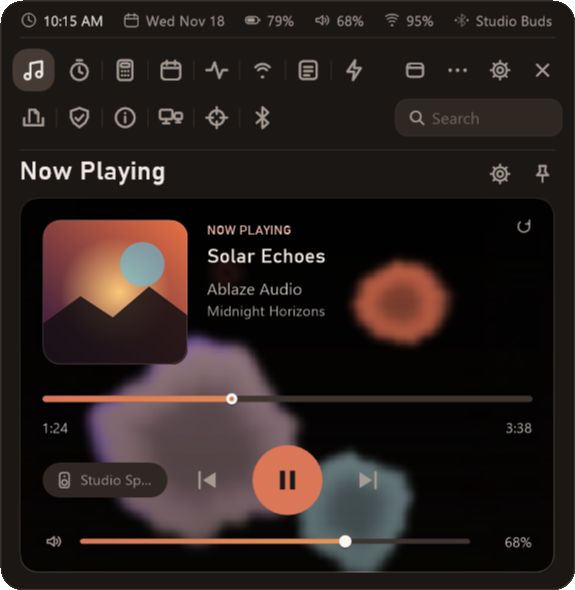
Now playing Solar Echoes Ablaze Audio Midnight Horizons
1 / 16

Now Playing. Whatever's playing, painted in the colors of its cover.

Your music, painted in the colors of its cover.

Play something in Spotify, Apple Music or a YouTube tab, and Ember picks the colors right out of the album art. Then it moves with the song. Pick a look, pick a cover, and watch.

Look
Cover
  • Turn on Music controls, then roll the mouse wheel over the song to change the volume
  • Switch between speakers and headphones in two clicks
  • Pin the card to your desktop and size it from 60% to 200%
Now playing Solar Echoes Ablaze Audio Midnight Horizons

The Island keeps what the taskbar used to.

Turn on Hide the Windows taskbar and your windows get the whole screen. The clock, the battery, the volume and your notifications move up to the Island, and the date, your tray icons, apps and search live in the hub. The Windows key still opens Start. Turn it off and the taskbar comes back just as it was.

The Island in its Glass look

Glass. Tinted glass with a soft sheen along the top.

Looks

Wear one, or mix any of them.

Text colors

From your theme's full accent down to something quiet.

Places and alerts

It goes where you put it, and speaks up when it should.

Eighteen widgets, one click from the Island.

Each one opens in the hub. Pin any of them to your desktop and it stays there as a card of its own.

Your day

  • Now PlayingThe song, its cover and where it's playing.
  • Notes & tasksQuick notes, a checklist and your clipboard.
  • CalendarYour month, holidays and any calendar link.
  • TimerA countdown, a stopwatch and a focus timer.
  • CalculatorType it or tap it. The sum stays beside its answer.
  • NotificationsEverything in one list, with Do Not Disturb.

Your PC

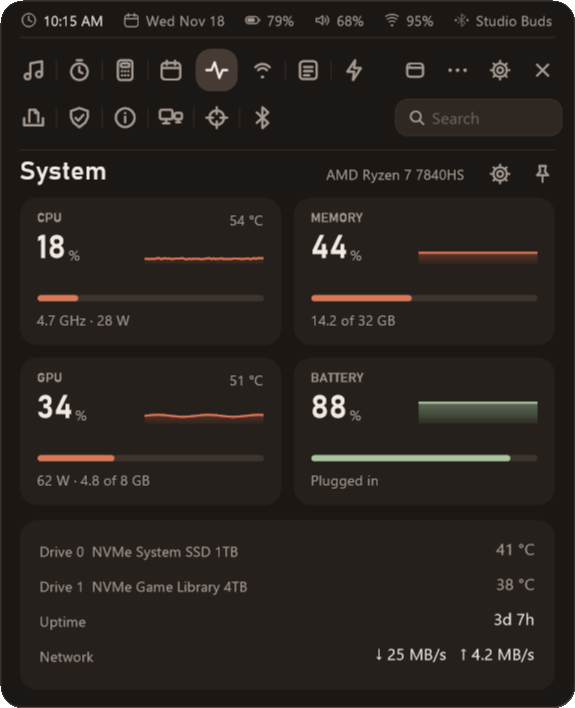
  • SystemProcessor, graphics, memory and drives.
  • Health checkWhat's slowing your PC, in plain words.
  • NetworkPing, speed and quick fixes like Flush DNS.
  • BluetoothYour devices and their batteries.
  • DisplaysArrange your screens, pick the main one.
  • System infoEvery detail of your PC, one click to copy.

Your things

  • ShelfFiles you drop on the Island wait here.
  • Quick launchYour apps, folders and handy Windows tools.
  • PhotosYour photos or wallpapers, right in the hub.
  • UsageHow much of your AI coding plan you've used.
  • CrosshairFive styles, nudged a pixel at a time.
  • SessionsEach game you play, its frame rate and heat.

Made for your games, and out of their way.

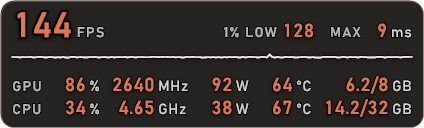
The overlay shows your frame rate, your 1% lows, frame times, temperatures, power and graphics memory in any corner you like, and the 0.1% lows at Details. While a game is in front, Ember holds its own motion still and leaves the room to your game.

Detail
  • CtrlAltDsteps through Standard, Details and Details+
  • CtrlAltPmoves the overlay to its next spot
  • CtrlAltScopies a picture of your last minute to share
  • CtrlAltXshows or hides the crosshair, while it's on
Ember's overlay at 144 frames a second, with the frame-time line and the graphics card and processor readings

Ten themes, each cozy in its own way.

Pick one and this whole page, the Island, the hub and the overlay change with it. Want your own color instead? There's a color wheel for that.

Pay once, or don't pay at all.

No subscription and no account. Ember Free is yours to keep, and the full Ember is $4.99, paid once in the Microsoft Store.

Ember Free

$0yours to keep

  • The overlay, with its standard layouts
  • The Island with the clock, battery and volume
  • Now Playing on the Island, with your media keys and volume
  • Notes, tasks and the calculator
  • Every accessibility option Ember has, and every one to come. Those are never paid.

Tell me when it launches

Ember

$4.99once, in the Microsoft Store

  • Everything in Ember Free
  • All four visualizers
  • Notifications on the Island, and Do Not Disturb
  • Every Island look and place, all ten themes and your own color
  • The volume of each app, your microphone and screen brightness
  • Desktop pins from 60% to 200%, the crosshair, Details+ and the share card
  • Displays, the Shelf, Sessions, Usage and the other widgets
Tell me when it launches

A few good questions.

When can I get it?

Ember is on its way to the Microsoft Store. Press "Tell me when it launches" to send us a quick note, and we'll write back once, the day it's out. That's the only email you'll get.

Will it slow my games down?

It's built not to. Ember is a small native Windows app with no web browser inside it. While a game is in front and you aren't using the hub or a pinned widget, it holds its own motion still, and it answers the moment you reach for it.

Does it show over fullscreen games?

Yes, over windowed and borderless games and most modern fullscreen ones. Only the older exclusive fullscreen mode keeps every overlay out, Ember's included. If yours uses it, pick borderless in the game's settings.

Does Ember collect anything about me?

No. There are no accounts, no analytics and no ads, and your notes and settings stay on your PC. Ember only goes online for three things you set up or open yourself, and the privacy page lists all three.

Make your desktop feel a little more like home.

Tell me when it launches